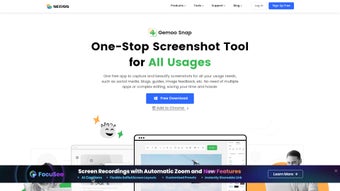

Download Gemoo Snap – Free Screenshot Tool for Mac
Overview
Gemoo Snap is a free multimedia application designed exclusively for macOS that streamlines the entire workflow of capturing, editing, and presenting screenshots. In a world where visual communication dominates social media, marketing, and remote collaboration, having a tool that can quickly turn a raw screen grab into a polished visual asset is essential. Gemoo Snap delivers that capability with an intuitive, drag‑and‑drop interface that feels natural even to users who have never edited an image before.
Once a screenshot is captured, the app opens a dedicated editor where you can resize the canvas to match the exact dimensions of popular platforms such as Twitter, Facebook, Instagram, LinkedIn, or even custom dimensions for presentations. The editor includes a robust set of annotation tools—magnifying lenses to highlight details, text boxes with flexible fonts and colors, shape overlays like arrows, circles, and rectangles, and a built‑in color picker for brand‑consistent styling. Beyond simple annotation, Gemoo Snap lets you compile multiple screenshots into a single presentation, adding slide transitions and background music if desired.
The result is a polished visual story that can be exported as PNG, JPEG, or PDF, ready for instant sharing or embedding. Because the app is free, it removes the price barrier that often forces users into cumbersome workarounds with generic image editors. Security is also baked in: all edits stay local on your Mac, and no unnecessary data is sent to the cloud unless you choose to share directly from the app.
Whether you’re a content creator, educator, developer, or business professional, Gemoo Snap offers a secure, fast, and feature‑rich environment for turning everyday screenshots into compelling visual communication.
Powerful Features That Make Gemoo Snap Stand Out
- One‑Click Capture: Grab the full screen, a window, or a custom region with a single shortcut.
- Platform‑Ready Resizing: Pre‑set canvas sizes for Twitter, Facebook, Instagram, LinkedIn, and more.
- Rich Annotation Toolkit: Magnifying lens, text, arrows, shapes, blur, and color highlighter.
- Multi‑Screenshot Presentation Builder: Combine up to 20 screenshots into a slide‑style deck with optional background music.
- Export Flexibility: Save as PNG, JPEG, PDF, or copy directly to the clipboard for instant pasting.
- Dark Mode Compatibility: Seamless visual integration with macOS dark theme.
- Keyboard Shortcut Customization: Tailor hotkeys to match your personal workflow.
- Secure Local Storage: All edits are saved locally; no cloud upload unless you initiate sharing.
Each of these features has been crafted with productivity in mind. The one‑click capture eliminates the need to juggle multiple utilities, while the platform‑ready resizing ensures that your visuals never get cropped or stretched when posted online. The annotation toolkit goes beyond basic arrows and text; the magnifying lens, for example, lets you zoom in on a specific UI element without losing context, which is incredibly useful for bug reports or tutorial guides.
The presentation builder turns a series of related screenshots into a cohesive story, complete with slide transitions that make it feel like a professional slide deck rather than a simple image dump. Export options are deliberately varied: PNG preserves lossless quality for high‑resolution displays, JPEG offers smaller file sizes for quick email attachments, and PDF creates a print‑ready document. Dark mode support respects the visual preferences of modern Mac users, reducing eye strain during late‑night editing sessions.
Finally, the ability to keep every edit on your local machine addresses privacy concerns that many users have with cloud‑based editors, making Gemoo Snap a trustworthy choice for confidential projects.
Installation, Setup & Compatibility
Getting started with Gemoo Snap is intentionally straightforward. Visit the official website, click the “Download for macOS” button, and the installer package (.dmg) begins downloading instantly. Once the download completes, open the .dmg file and drag the Gemoo Snap icon into your Applications folder—a familiar process for any Mac user. The first launch triggers a brief permissions request: the app needs access to your screen for capture and to your Files & Folders for saving edited images. Granting these permissions is safe; Gemoo Snap operates entirely offline unless you actively choose to share content via its built‑in social shortcuts.
Compatibility is limited to macOS 10.14 (Mojave) and later, covering the vast majority of active Mac devices in 2025. The software runs natively on both Intel‑based Macs and Apple Silicon (M1, M2, and later) thanks to Apple’s Universal Binary support, ensuring smooth performance regardless of hardware. System requirements are modest: a minimum of 200 MB of free disk space, 2 GB RAM, and a graphics subsystem capable of basic 2D rendering—requirements that even older MacBook Air models meet comfortably.
After installation, the initial setup wizard walks you through configuring default hotkeys, selecting your preferred export folder, and enabling optional integrations such as direct posting to Twitter or copying to the clipboard. These preferences are stored in a lightweight preferences file within your user library, making it easy to reset or migrate settings when you switch machines. For users who rely on multiple monitors, Gemoo Snap automatically detects all connected displays and allows you to choose which screen to capture, a crucial feature for developers testing multi‑screen applications. Finally, the app checks for updates once a week in the background; any available update is presented as a non‑intrusive notification, ensuring you always have the latest features and security patches without manual effort.
Pros, Cons, FAQ & Final Verdict
Pros
- Completely free with no hidden in‑app purchases.
- Fast, one‑click screen capture tailored for macOS.
- Extensive annotation tools, including a unique magnifying lens.
- Built‑in presentation mode for turning multiple screenshots into a slide deck.
- Native support for both Intel and Apple Silicon Macs.
- Secure local processing—no automatic cloud uploads.
- Regular updates keep the feature set fresh.
Cons
- Currently macOS‑only; no Windows, Android, or iOS version.
- No advanced vector editing (e.g., SVG export).
- Lacks a built‑in cloud sync feature for multi‑device workflows.
- Presentation builder caps at 20 slides, which may be limiting for large projects.
Frequently Asked Questions
Is Gemoo Snap really free, or are there hidden fees?
Gemoo Snap is completely free to download and use. There are no subscription plans, in‑app purchases, or hidden fees. All features described on the website are available to every user.
Can I use Gemoo Snap on a Windows PC?
At this time Gemoo Snap is built exclusively for macOS. The development team has expressed interest in expanding to Windows in the future, but no official timeline has been announced.
How does Gemoo Snap handle privacy and data security?
All editing happens locally on your Mac. The app does not automatically upload images to any server. The only time data leaves your device is when you deliberately share a screenshot using the built‑in social shortcuts.
What export formats are supported?
You can export screenshots as PNG, JPEG, or PDF. The PDF option is especially handy for creating printable reports or multi‑page documents.
Is there a limit to how many screenshots I can store in the app?
Gemoo Snap does not impose a hard limit on the number of individual screenshots you can capture. However, the built‑in presentation builder allows up to 20 slides per project, after which you’ll need to start a new presentation.
Final Verdict
For Mac users who need a fast, reliable, and completely free solution for turning everyday screenshots into professional‑grade visuals, Gemoo Snap hits almost every mark. Its blend of one‑click capture, rich annotation tools, and the ability to stitch multiple images into a polished presentation makes it a versatile addition to any workflow—whether you’re crafting a tutorial, preparing a bug‑report, or simply sharing a highlight on social media. While the lack of a Windows version and the absence of advanced vector features may disappoint power users, the core functionality remains robust and well‑optimized for macOS. In short, if you’re looking to upgrade your screenshot game without spending a dime, Gemoo Snap is a secure, user‑friendly, and feature‑rich option that deserves a spot on your Mac.
Ready to enhance your visual communication? Download Gemoo Snap now and start creating polished screenshots instantly.







